Kling 4.0 vs Kling 3.0: Key Differences Side by Side
Kling4 TeamPublished on
Table of Contents
Kling 4.0 doubles the longest single take from 15 to 30 seconds, replaces Kling 3.0's start-frame-plus-elements setup with one reference system that takes up to 15 assets, and adds middle keyframes, a 21:9 frame and four more speech languages. Kling 3.0 hasn't become pointless, though. On Kling4 it's the only model with a 4K setting and a switch to turn sound off, and every second costs less. Both run here: Kling 4.0 on the home page and Kling 3.0 on its own page. So the useful question isn't which model is newer. It's which one suits the shot you're about to make.
Below: what Kling 3.0 does at its best in three of Kling AI's own demos, where the matching Kling 4.0 demos live on this site, a spec table with a source for every row, what each length costs on Kling4, and a verdict for each kind of job.
How we compared them, and what we didn't do
We haven't run the same prompt through both models yet. A fair same-prompt test costs credits on both sides, and we haven't set aside a budget for it. So the clips below are official Kling 3.0 demos from Kling AI's user guide, each shown with the exact prompt Kling published next to it.
Treat them as a ceiling, not an average. A vendor publishes the takes that worked, made on its own platform with its own settings. They show what Kling 3.0 can do when the prompt, the start frame and the luck all line up. They don't tell you how often a typical run gets there, and they don't put the two models on equal terms.
Every Kling 4.0 demo we host already belongs to another page of this site, one clip per page. Rather than repeat them, the section after the Kling 3.0 clips points to the ones that answer the same questions. If you're comparing Kling with other model families instead, see Kling 4.0 vs Veo and Kling 4.0 vs Seedance.
Why the version choice matters on Kling4
Both models are live here, with different controls and different prices, and the trade-off isn't obvious from the version number:
- The free, no-login clip runs on Kling 4.0 only: 5 seconds at 720p with a watermark, once every 24 hours per visitor. Kling 3.0 needs a signed-in account and credits.
- Kling 4.0 is the one to reach for when a take must run past 15 seconds. Kling 3.0 is the one when you need 4K, since this site renders Kling 4.0 at 1080p at most.
- Credits per second differ by 20 to 25 percent. That's small for one clip and noticeable across a batch of thirty social cutdowns.
Pick the wrong one and you either pay Kling 4.0 rates for a short clip that Kling 3.0 would have handled, or you spend an afternoon joining two 15-second takes that one Kling 4.0 run would have covered.
Kling 3.0 at its best: three official demos
All three come from the Kling 3.0 user guide, dated February 6, 2026, and each began from a still image used as the start frame. That's an input Kling4 also accepts for Kling 3.0.
Six camera setups in fifteen seconds
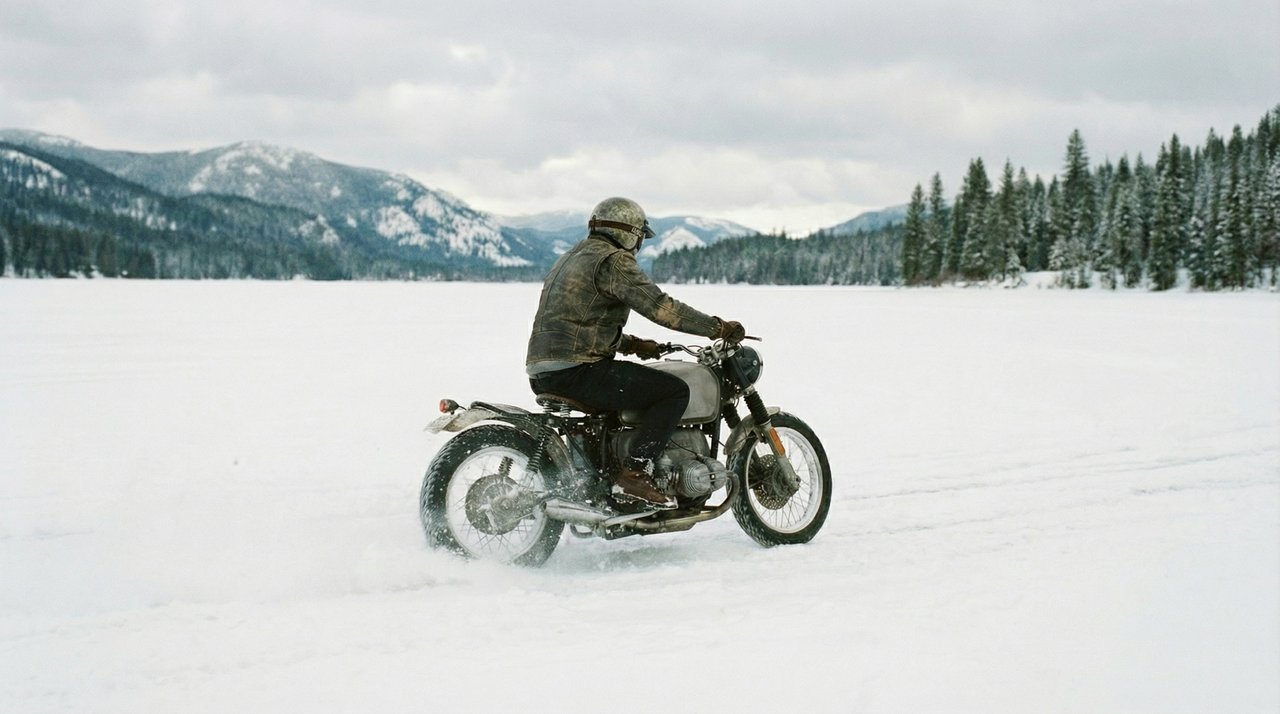
The guide uses this one to show multi-shot storytelling. Notice that the prompt is written as a numbered shot list, with a camera position for each shot and a description of the setting only at the end.
Prompt by Kling AI:
Shot 1, Low-angle rear wide shot, tracking behind the rider as they move forward. Shot 2, Low-angle side close-up, a detailed shot of the motorcycle wheel. Shot 3, First-person POV from the rider, with the handlebars and instrument panel visible ahead. Shot 4, Frontal medium shot, tracking backward in front of the motorcycle, the rider’s helmet facing the camera. Shot 5, Side-on eye-level tracking shot with slight lateral movement. Shot 6, High-angle wide shot with a gentle downward tilt. The camera rises as the snowmobile rides deeper into the snowfield, leaving winding tracks carved into the pristine white snow, with snow-covered forests scattered on both sides.
 Start frame
Six setups in the order the prompt lists them: rear wide, wheel close-up, handlebar view, a frontal shot with the visor facing the lens, a side pass, and a high wide shot as the tracks curve away.
Demo by Kling AI · Kling 3.0 user guideStep through it and the cuts fall at roughly 2, 4, 6, 9 and 12 seconds, so each setup gets two to three seconds of screen time. The order matches the prompt one for one. There's also a small slip in the prompt itself: the first five shots talk about a motorcycle, and the last sentence calls it a snowmobile. The clip keeps the motorcycle from the start frame the whole way through, so when the text and the picture disagreed, the picture won. That's usually the outcome you want.
On Kling4 there's no storyboard panel in the Kling 3.0 composer, so a shot list like this has to live in the prompt, exactly as it's written here. We haven't measured how closely a Kling4 run follows six numbered shots.
Four speakers on one sofa
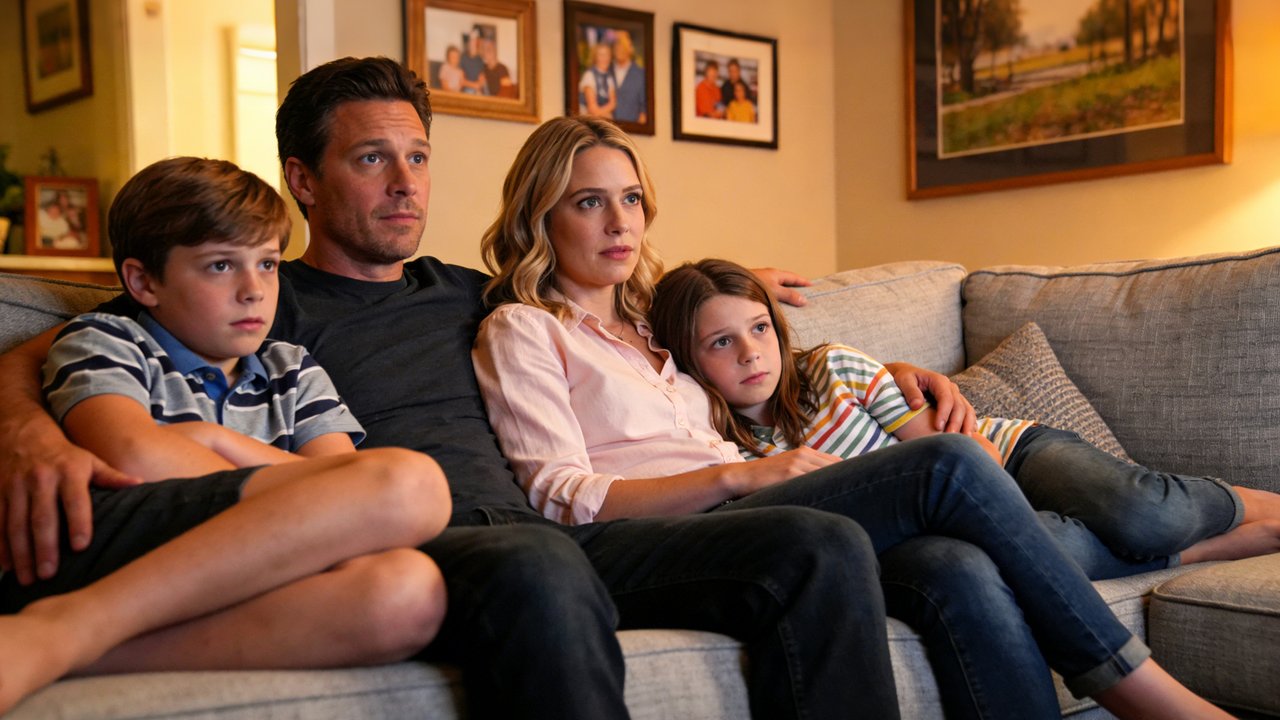
This demo is about dialogue. Each line is attached to a named person and comes with a note on delivery, and a short line about room tone opens the prompt.
Prompt by Kling AI:
Home setting with a faint hum of the living room air conditioner in the background for a realistic daily vibe. Mom (softly, in a surprised tone): Wow, I didn’t expect this plot at all. Dad (in a low voice, agreeing, in a calm tone): Yeah, it’s totally unexpected. Never thought that would happen. Boy (in an excited tone): It’s the best twist ever! Girl (nodding along, in an enthusiastic tone): I can’t believe they did that!
 Start frame
Ten seconds, four lines, one cut. The wide frame holds the whole family, then the shot moves in tighter as the boy springs forward off the sofa.
Demo by Kling AI · Kling 3.0 user guideWhat the guide is showing off is what Kling calls multi-character coreference: three or more people in one clip, and each line meant for the person the prompt names just before it. The format is easy to copy. Write the name, put the delivery note in brackets, add a colon, then the words. Notice too that the prompt spends one sentence on background sound and never mentions music, which keeps the mix to voices and the air conditioner.
Cantonese, with English mixed in
The third demo tests speech in a regional variety, with code-switching, inside a short, tight line of dialogue.
Prompt by Kling AI:
In a high-rise office building, the man leaned back, wearing a tired, disdainful expression, and said in Cantonese: 「其实……我真系唔系好 buy 你呢个 logic 啰。成个 proposal 根本 align 唔到我哋个 core value。你个 flow 咁乱,点样去 convince 个 client 呀?不如你返去 re-think 下个 angle,听朝早我要见到个 final version。」
 Start frame
One locked-off medium shot with no cut. Everything rests on the voice and the face as he sits back in his chair, phone to his ear.
Demo by Kling AI · Kling 3.0 user guideThe line slips English office jargon (buy, logic, proposal, align, core value, flow, client, final version) into Cantonese sentences. The 3.0 guide lists code-switching and names Cantonese among its supported dialects, and the Kling 4.0 guide keeps Cantonese on its list. We don't speak Cantonese, so we're not grading the pronunciation. The demo shows what Kling says it built for, not a result we checked by ear.
Where the Kling 4.0 demos are
We didn't embed any Kling 4.0 clips here, because each one already lives on another page. These are the ones that answer the same three questions:
- Several shots in one generation. The Kling 4.0 home page has Kling AI's felt-forest counting lesson: 15 seconds, five hard-cut shots, three characters, built from one style image. It's the same length as the snowfield clip and the closest like-for-like we can show.
- Speech. Also on the home page, a 15-second clip of an old man ranting about AI came from a six-word prompt, and a 15-second vertical pitch has a presenter talking to camera about the puffer jacket she's wearing, built from one reference image.
- Length Kling 3.0 can't reach. In our Kling 4.0 release date and specs post, a pianist plays on the bow of a storm-tossed ship for 22 seconds, made from four keyframes that include middle frames. Kling 3.0 stops at 15 seconds and has no middle keyframes.
- Starting from your own picture. The image to video page collects Kling 4.0 demos that begin from a still, including one built from a first and a last frame.
- Borrowing motion from a clip. The motion control page gathers Kling 4.0 demos in which a reference clip supplies the movement, camera path and timing. In the 3.0 generation that job went to a separate model, Kling 3.0 Motion Control.
Kling 4.0 vs Kling 3.0 specs
"Kling's platform" means what Kling AI documents for its own site. The two rows marked "on Kling4" are what you get when you generate here.
| Kling 3.0 | Kling 4.0 | Source | |
|---|---|---|---|
| Available since | Fully rolled out Jan 31, 2026 | Open to everyone Oct 15, 2026 | 3.0 release note, 4.0 release note |
| Longest single generation | 15 s (3–15 s) | 30 s (3–30 s, 1 s steps) | 3.0 guide, 4.0 guide |
| Resolution, Kling's platform | 720p, 1080p; 4K mode added Apr 23, 2026 | 720p, 1080p, 4K; 10-bit HDR "coming soon" | 3.0 4K note, 4.0 guide |
| Aspect ratios, Kling's platform | No list on an official page we found | 21:9, 16:9, 1:1, 9:16, Auto | 4.0 guide |
| Sound | Native audio, can be switched off | Two-channel stereo, sync on by default; voice reference upload only | 3.0 guide, 4.0 guide |
| Speech languages | Chinese, English, Japanese, Korean, Spanish; other languages turned into English | The same five plus Portuguese, German, French and Hindi | 3.0 guide, 4.0 guide |
| Dialects and accents | Northeastern, Beijing, Taiwanese, Cantonese, Sichuanese; American, British, Indian English | Same Chinese varieties; same three English accents | 3.0 guide, 4.0 guide |
| References | Start frame plus elements built from 2–4 images or a video, voice optional; separate 3.0 Omni model | Omni Reference: 15 assets (10 images, 5 clips totalling 30 s, 3 voice profiles, 7 elements) | 3.0 guide, 4.0 guide |
| Keyframes | Start frame | Up to 10 images: first, last, both, or middle frames anywhere on the timeline | 3.0 guide, 4.0 guide |
| Multi-shot | Automatic Multi-Shot or Custom Multi-Shot | On by default (Smart Storyboard, no toggle) | 3.0 guide, 4.0 guide |
| Editing | 3.0 Omni edits clips; input raised to 3–15 s on Jun 17, 2026 | Edits up to 5 clips, 30 s in total | 3.0 Turbo note, 4.0 guide |
| Extension | Not listed in the 3.0 guide | Up to 2 min, "coming soon" | 4.0 guide |
| Price, Kling's platform | At launch 9 credits/s (720p) or 12 (1080p) with native audio, 6 or 8 without; 4K 30 credits/s | No per-second price published | 3.0 guide, 3.0 4K note |
| Settings on Kling4 | 4–15 s; 720p, 1080p, 4K; 16:9, 9:16, 1:1; text, or one or two pictures (first, then last frame); sound on or off | 3–30 s; 720p, 1080p; 16:9, 9:16, 1:1, 21:9; text, a first frame with an optional last frame, or a reference set; sound always on | Kling 3.0 page, home page |
| Credits per second on Kling4 | 2.5 at 720p, 4 at 1080p, 10 at 4K | 3 at 720p, 5 at 1080p; 1.8 or 3 with a reference clip | Kling4 composer |
Two rows deserve a closer look. Kling 4.0 lists four more speech languages, and Kling marks German, French and Hindi as new. And the reference row is where the models differ most in how you work: Kling 3.0 asked you to build a reusable "element" first, while Kling 4.0 lets you throw images and clips into one prompt and say what each one is for. On Kling4 the composer turns three or more images, or any clip, into a Kling 4.0 reference set; it attaches one clip per run for now.
What each length costs on Kling4
Base rates in credits, rounded to whole credits the way the composer rounds them. Your plan's exact price shows in the composer before you click Create, and what a credit costs depends on your pack or plan; see pricing.
| Clip | Kling 3.0, 720p | Kling 3.0, 1080p | Kling 3.0, 4K | Kling 4.0, 720p | Kling 4.0, 1080p |
|---|---|---|---|---|---|
| 5 s | 13 | 20 | 50 | 15 | 25 |
| 10 s | 25 | 40 | 100 | 30 | 50 |
| 15 s | 38 | 60 | 150 | 45 | 75 |
| 30 s | Two 15 s runs: 76 | Two runs: 120 | Two runs: 300 | 90 | 150 |
The last row is the honest catch. Kling 3.0 can reach 30 seconds of footage for less than Kling 4.0 at 720p and 1080p, but as two separate takes. Lighting, faces and camera position won't necessarily match at the join, and you do the cutting yourself. Adding a reference clip to a Kling 4.0 run changes the math too: the rate drops to 1.8 or 3 credits, but billing counts the output length plus whichever is longer, the clip or the output. A 10-second 1080p run with a 10-second reference clip is billed for 20 seconds, so 60 credits instead of 50.
Which one to pick
Pick Kling 4.0 when…
- The take has to run longer than 15 seconds. A 20-second product turnaround or a 25-second monologue fits in one generation, with no join to hide.
- You're framing for 21:9. On Kling4, Kling 3.0 stops at 16:9, 9:16 and 1:1.
- You're working from three or more images, or from a clip. That becomes a Kling 4.0 reference set here. Kling 3.0's composer takes two pictures at most.
- The lines are in Portuguese, German, French or Hindi. Kling 3.0's guide says it turns languages outside its five into English.
- You want to see a result before paying anything. The no-login clip runs on Kling 4.0.
Pick Kling 3.0 when…
- You need a 4K master. On Kling4, Kling 3.0 is the only model with a 4K setting, so you can punch in or change the framing later without dropping below HD.
- You want a clip with no sound at all. Kling 3.0 has a sound switch here. Kling 4.0 always generates audio, which you'd then strip out of any footage that gets its own music later.
- The clips are short and there are lots of them. At 10 seconds and 1080p it's 40 credits against 50. Over a batch, that's a fifth of the bill.
- You're adding to a series already made on Kling 3.0 and want the new shots to match the old ones.
Either one works when…
- The dialogue is in English, Chinese, Japanese, Korean or Spanish, or in one of the Chinese varieties both guides list, Cantonese included.
- You're animating one start frame, or a first and a last frame, at 720p or 1080p, in 15 seconds or less.
What we'd like to test next
The comparison this page is missing is the obvious one: one prompt set run through both models on Kling4 at the same length and resolution, with the pairs shown side by side. The questions we'd most want it to answer are whether Kling 4.0 holds a face steadier through a 15-second take, how each model copes with a four-person scene written like the sofa prompt above, and how much a 30-second Kling 4.0 take drifts by its last few seconds. Until we've run it, this page compares published specs and vendor demos, nothing more.
For the other two head-to-heads, read Kling 4.0 vs Veo, on Google's model, and Kling 4.0 vs Seedance, on ByteDance's.
- #Kling 4.0
- #Kling 3.0
- #Comparisons